Free Calculators Hub
Add or Subtract From a Date
Adds or subtracts whole calendar units from an ISO date, clamping invalid month-end results to the destination month’s final day.
Limitation: This tool performs calendar arithmetic, not legal deadline computation.
How to Add or Subtract Dates
Choose a start date, operation, whole-number amount and unit. Days and weeks represent fixed counts of calendar dates. Months and years preserve the day number where possible and otherwise use the final valid day of the target month.
Select the date where the calculation begins.
Month-end rule
Adding one month to January 31 produces February 28, or February 29 in a leap year, because February has no 31st day.
How Calendar Date Arithmetic Works
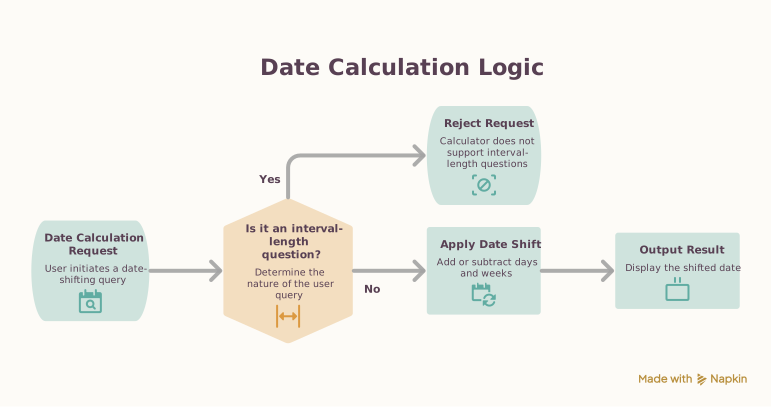
This calculator answers a date-shifting question, not an interval-length question. For day and week operations, it advances or reverses by calendar-day indexes. For month and year operations, it changes the month or year first, then clamps the original day to the last day available in the destination month. That explicit rule prevents rollover surprises such as treating January 31 plus one month as a date in March.
Date Arithmetic Examples
Add a month at leap-year month end
Start and adjustment
Result date
The day is clamped from 31 to February 2024’s last valid day.
Subtract a day across a month boundary
Start and adjustment
Result date
A one-day calendar shift crosses into February.
Deadline caution
If a real deadline moves when it falls on a weekend or holiday, calculate the raw date here and verify the governing rule separately.
Frequently Asked Questions
Still have questions about this calculation?
Try the CalculatorDate Addition and Subtraction Formula
The selected unit determines whether the operation uses day indexes or calendar fields.
Formula
Days and weeks
result day index = start day index ± amount × unit length
Months and years
target month = start month ± amount; result day = min(start day, days in target month)
Scientific Background
Dates use the proleptic Gregorian calendar. They are date-only values: no local clock time, UTC offset or daylight-saving transition is added.
Sources & review
Date Calculator documents the references behind its formulas and assumptions. Always treat results as educational estimates, not personalized professional advice.
Last reviewed
July 21, 2026
Reference
rfc-editor.org
https://www.rfc-editor.org/rfc/rfc3339#section-5.6Free Calculator Hub methodology
Free Calculator Hub
/methodology
See our methodology and corrections policy.